Neo IQ
AI construction software built on the records your business runs on
Neo IQ turns the crew, compliance and project records you already keep in Neo into answers you can act on. Ask a question in plain English and get an answer in seconds, with a short explanation, the rows behind it and a chart where it helps. Neo IQ is currently in beta.
Trusted by small, medium and large subcontractors across Australia






Make smarter operational decisions with the full picture
Your schedules, timesheets, productivity, compliance and payroll already live in Neo. Neo IQ puts that data to better use – giving you intelligence you can run the business on.
Act on the hours while they still matter
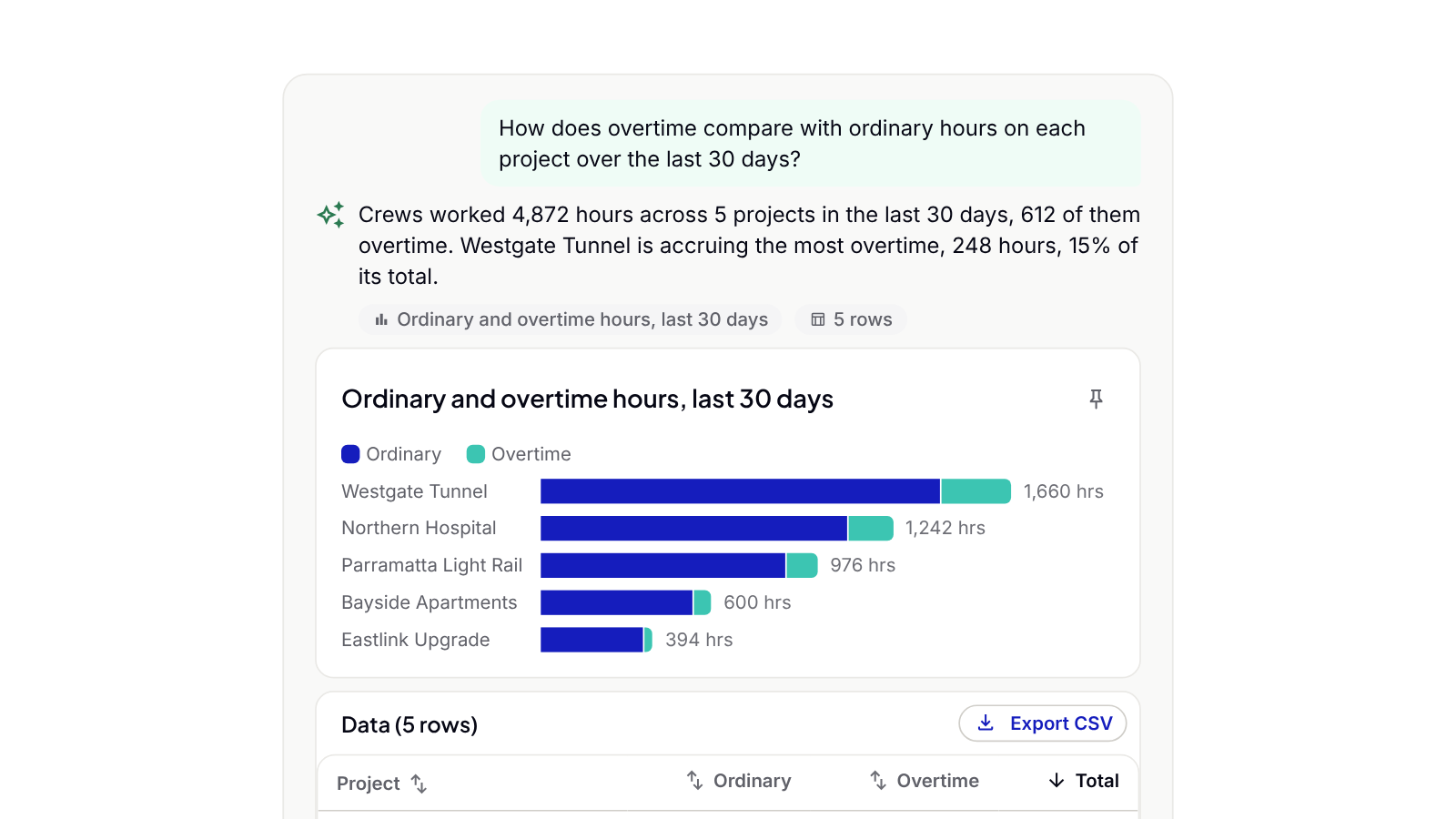
Ask about hours, overtime or project allocations and get the answer in one step. For example, you could compare overtime with ordinary hours on every project this month before you lock in next week’s roster. The answer arrives in time to change the decision.
Know who’s ticketed before you allocate
Ask whose tickets or competencies expire in the coming weeks and get the list before you finalise next week’s crew. Catch expiring tickets before you finalise your schedule.
Take manual reporting out of your team’s week
Your payroll and admin team can pull attendance, leave, ticket expiry and overtime reports in one step, without filtering, exporting and collating by hand. That leaves more of the week for pay runs and compliance work that can’t slip.

Get answers without waiting on the office
Ask in your own words and get the answer yourself. You don’t need a report builder or field names. A follow-up like “now split that by project and trade” breaks the answer down without starting again.
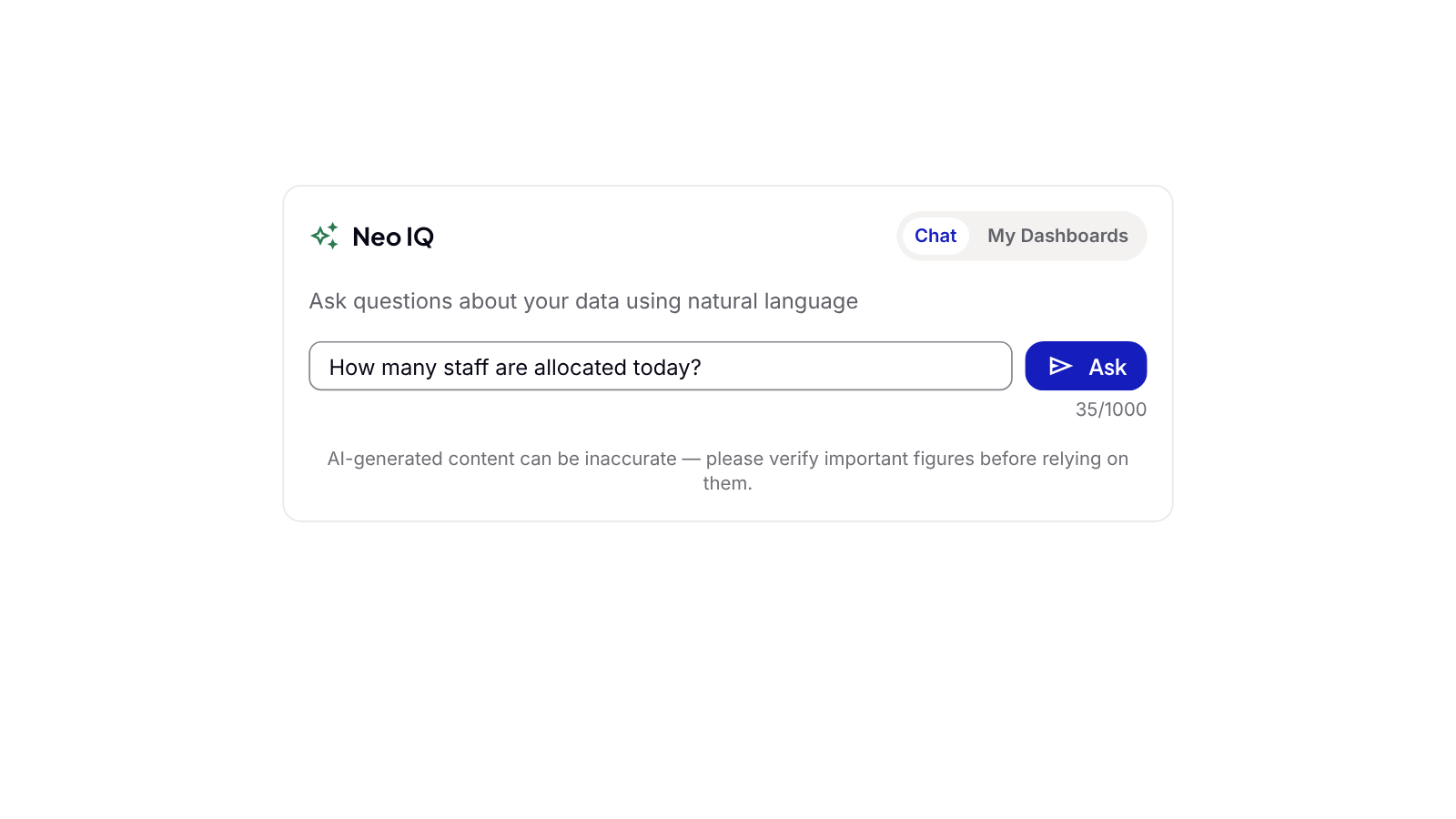
Ask AI a question
Open Neo IQ from the Admin Console and type your question the way you’d ask it across the desk. For example, “How many staff are allocated today?”. If you use production tracking, you can also ask questions from the Productivity Dashboard, where Neo IQ uses the filters already on screen.
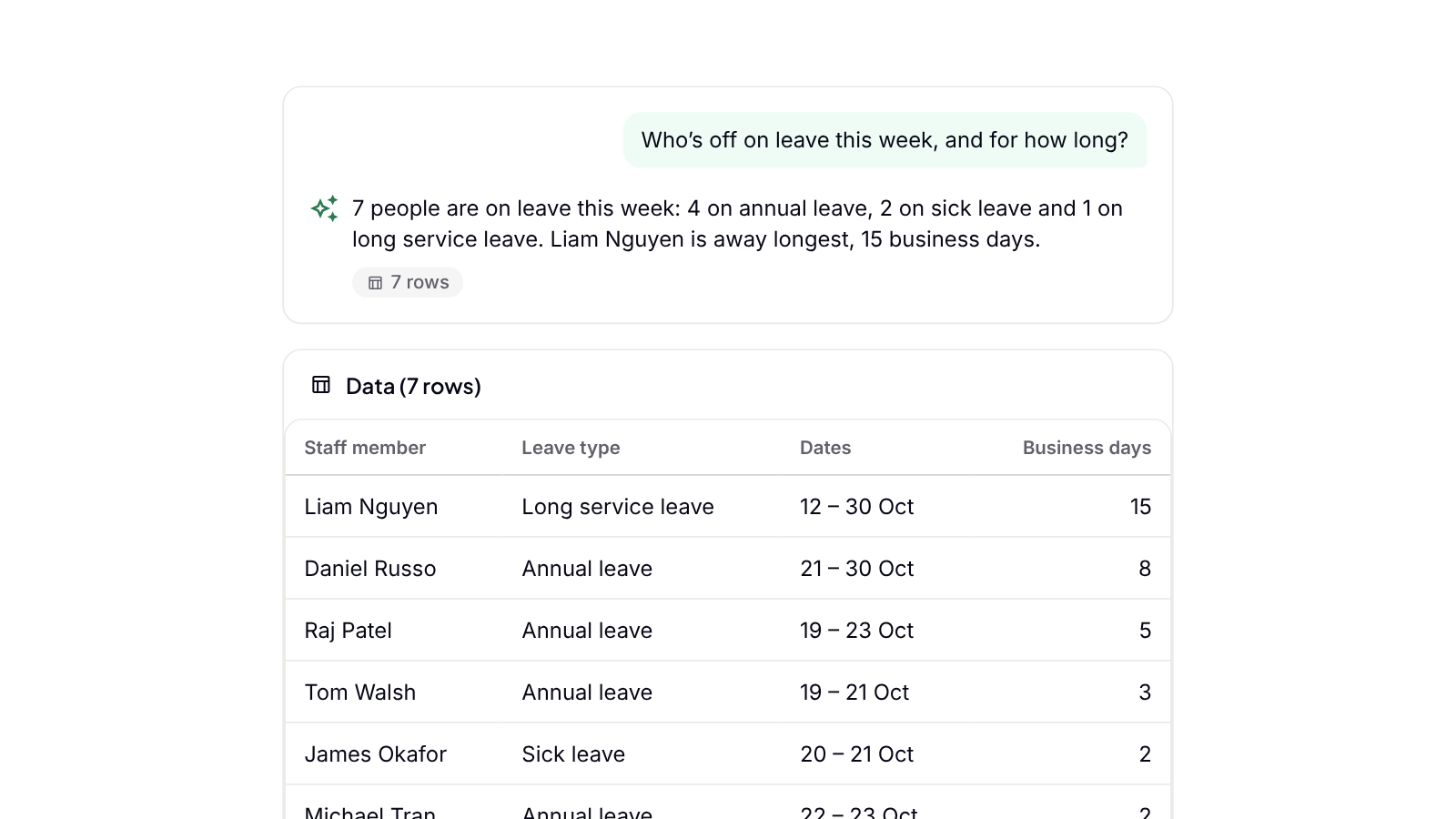
Neo IQ finds the right data in Neo
Neo IQ starts from the records Neo already holds for your business, so there’s nothing to import or connect. For example, ask who’s off this week and it pulls together who’s on leave, when and for how long, broken down by leave type. Every query is checked before it runs, and anything that would change your data is blocked.
Get an answer and what it shows
Neo IQ explains what the numbers show in plain English and adds a chart where it helps. For example, ask how overtime compares with ordinary hours on each project over the last 30 days, and you get a stacked chart and a summary of which projects are accruing the most. The rows behind the answer sit underneath, ready to sort or export to CSV (up to 100 rows).
Ask follow-up questions and pin answers
Keep asking and Neo IQ builds on the previous answer, for example by splitting today’s allocation by site and trade or comparing this month with last. When a chart is worth keeping, pin it to a dashboard and it updates with current data every time you open it. Make a dashboard public to share it with colleagues in your business.

Neo connects every project from site to office
One platform. All your operations. A smarter, more profitable way to run your subcontracting business.
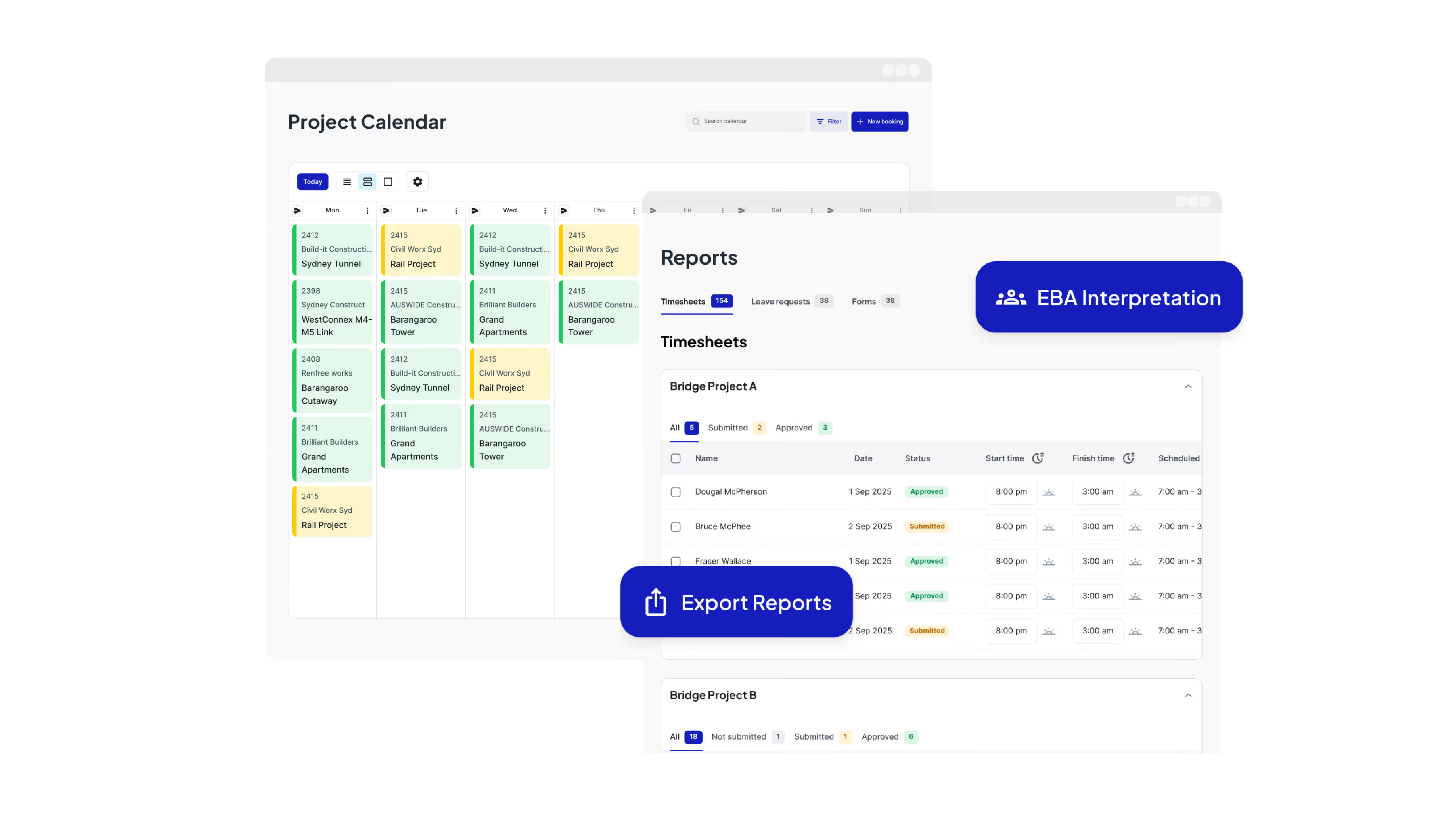
Run Your Operations from One Dashboard
Plan projects, schedule crews, manage compliance, approve timesheets, run payroll and oversee reporting all from one place.

Keep your crews connected and productive on site
Get schedules and project information, log and approve timesheets, capture site diaries and complete digital forms from your mobile phone.
Leading Australian subcontractors run their business with Neo.
How GVK Group reduced payroll processing by 90% and streamlined scheduling with Neo
See how GVK Group uses Neo construction management software to automate EBA payroll, scheduling and digital forms across large subcontractor teams.
Features

How Sambar Plumbing reduced scheduling time by 90% with Neo
Discover how Sambar Plumbing uses Neo construction management software to streamline scheduling, digital timesheets and site diary reporting.
Features

How C3 Construction Group reduced payroll processing by 80% and scheduling time by 50% with Neo
See how C3 Construction Group uses Neo construction management software to streamline payroll, scheduling and safety documentation.
Features
How SDC Group scaled their subcontractor operations without adding extra admin
Learn how SDC Group uses Neo construction management software to reduce admin workload and improve project coordination.
Features

How SG Formwork reduced payroll processing and resource allocation by 80% with Neo
Discover how SG Formwork uses Neo construction management software to streamline payroll, labour tracking and workforce visibility.
Features
How Neo’s construction software delivered a 50% reduction in admin time for BSECC
See how BSECC uses Neo construction management software to automate EBA payroll, improve scheduling and simplify site reporting.
Features

Frequently Asked Questions
Common questions about Neo Intelligence and how it works
Subcontractors can use AI to get answers from the records they already keep, without building reports by hand. Neo IQ is the AI built into the Neo Platform for this. You ask about your crews, hours, compliance or projects in plain English and get back a short explanation and the rows behind it, with a chart where it helps. That makes AI construction reporting part of your everyday work, built on your own Neo records.
Neo IQ covers labour, timesheets, leave, staff and compliance, projects, attendance, payroll, productivity, equipment and weather. New records flow in automatically. You can ask questions like “How many overtime hours did we do on this project versus ordinary time?” or “Show me crew members with training expiring in the next two months.” You don’t need a report builder or special commands.
Neo IQ works on the records your business already keeps in Neo, from crew allocations through to payroll and productivity. It understands how subcontractors describe that work, finds the right records, runs the analysis and explains what the result shows. A spreadsheet leaves that analysis to you. General AI tools need you to export and explain your data first, and most AI construction software is built around head-contractor projects or site paperwork.
Every answer includes a table of the rows behind it, so you can check the figures yourself. A note at the bottom of the chat panel reminds you to check important figures before you rely on them. Neo IQ is only as accurate as the records behind it, so complete timesheets and site records give better answers.
Yes. Export up to 100 rows of an answer to CSV, or pin a chart to your own dashboard, where it refreshes with current data each time it opens. To share a dashboard, make it public so colleagues in your business can see it.
AI construction reporting uses AI to turn your project and workforce data into a report when you need it. Neo IQ builds each report from your own Neo records as you ask, so there’s no template to set up or spreadsheet to maintain. If you use production tracking, AI Summary on the Productivity Dashboard also writes a short overview and three to five key insights for the project, dates and areas you’re viewing.
Ready to see an easier way to run your subcontracting business?
Get the clarity, accuracy and confidence you need to keep jobs and crews moving.