Crew Management
Total visibility across your crew
Manage crew profiles, track compliance and align availability with leave schedules. Know who your people are, what they’re qualified to do and when they’re available.

Trusted by small, medium and large subcontractors across Australia






Increase crew oversight without the admin
A connected platform that tracks crew data and keeps scheduling, compliance and payroll aligned.

One source of crew data
A single source of truth for skills, allowances, compliance and leave, so office and site are always working from the same data.
Allocate crews with confidence
Allocate crews based on facts – not assumptions. See skills, compliance and leave instantly, reducing stand-downs on site.

Track compliance automatically
Licences, tickets and expiries tracked automatically, with reminders sent before issues arise. Keep job sites safe and audit ready.
Integrate with your payroll
Profiles connect to schedules and timesheets, keeping allowances, employment details aligned and payroll-ready.
Know your crew and what they can do
Create and manage a complete profile for every worker, including skills, qualifications, allowances, permissions and leave. Make smarter scheduling decisions.

Stay compliant without chasing paperwork
Store and manage all crew licences, tickets and qualifications in a single platform, with expiries tracked against each worker. Non-compliance is flagged early and automatic reminders are sent automatically.

Simplify leave requests
Crews submit leave in the Field App. Once approved, availability and schedules update automatically – removing manual changes and ensuring rosters always reflect who is actually available.

Neo connects every project from site to office
One platform. All your operations. A smarter, more profitable way to run your subcontracting business.
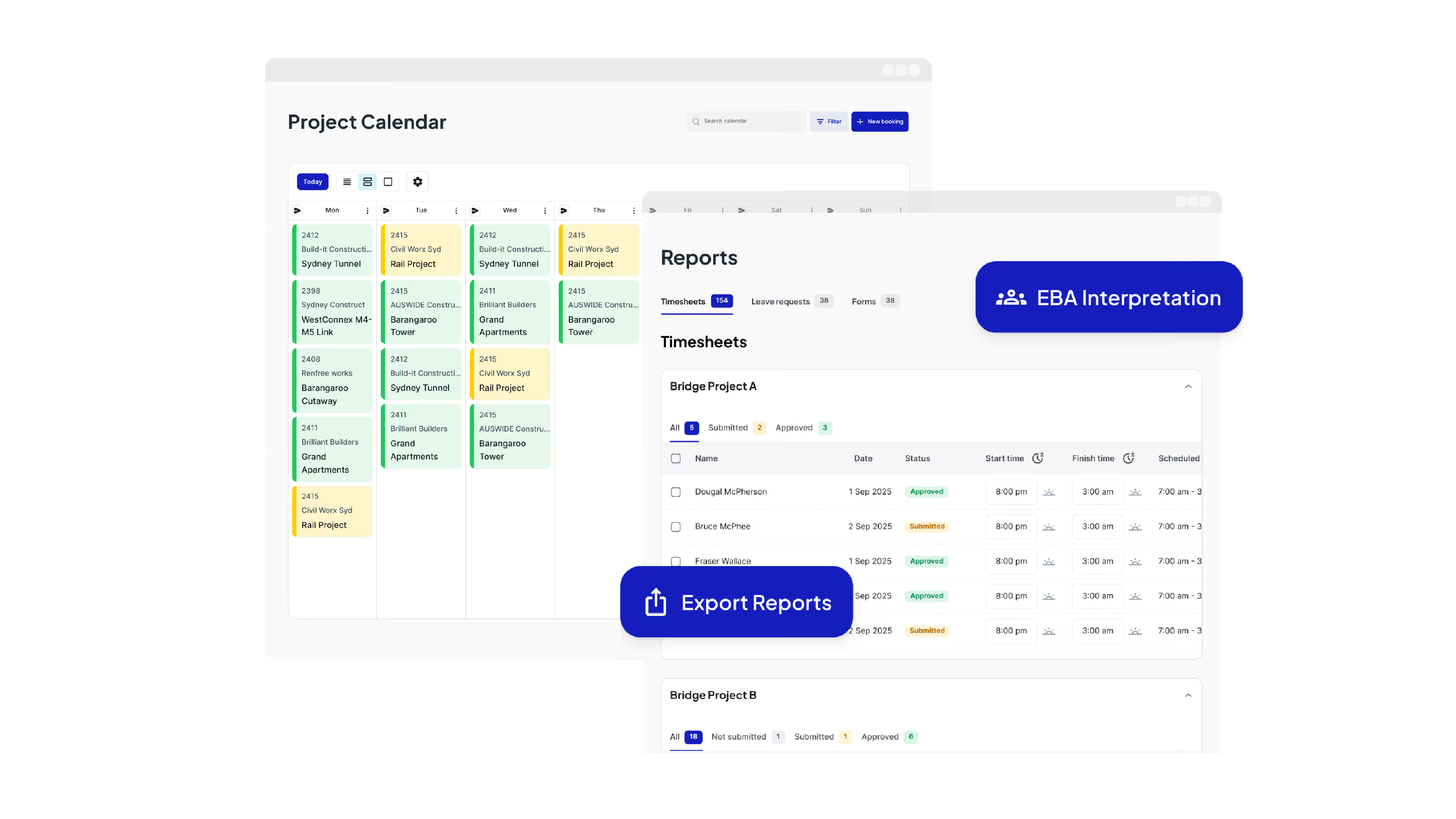
Run Your Operations from One Dashboard
Plan projects, schedule crews, manage compliance, approve timesheets, run payroll and oversee reporting all from one place.

Keep your crews connected and productive on site
Get schedules and project information, log and approve timesheets, capture site diaries and complete digital forms from your mobile phone.
Leading Australian subcontractors run their business with Neo.
How GVK Group reduced payroll processing by 90% and streamlined scheduling with Neo
See how GVK Group uses Neo construction management software to automate EBA payroll, scheduling and digital forms across large subcontractor teams.
Features

How Sambar Plumbing reduced scheduling time by 90% with Neo
Discover how Sambar Plumbing uses Neo construction management software to streamline scheduling, digital timesheets and site diary reporting.
Features

How C3 Construction Group reduced payroll processing by 80% and scheduling time by 50% with Neo
See how C3 Construction Group uses Neo construction management software to streamline payroll, scheduling and safety documentation.
Features
How SDC Group scaled their subcontractor operations without adding extra admin
Learn how SDC Group uses Neo construction management software to reduce admin workload and improve project coordination.
Features

How SG Formwork reduced payroll processing and resource allocation by 80% with Neo
Discover how SG Formwork uses Neo construction management software to streamline payroll, labour tracking and workforce visibility.
Features
How Neo’s construction software delivered a 50% reduction in admin time for BSECC
See how BSECC uses Neo construction management software to automate EBA payroll, improve scheduling and simplify site reporting.
Features
Frequently Asked Questions
Common questions about Neo Intelligence and how it works
Neo’s Crew Management feature is a central place to manage everything about your crews, including profiles, skills, compliance, permissions and leave. All data is connected directly to scheduling, timesheets and payroll workflows.
Neo is used by trade and labour-intensive subcontractors who manage crews across multiple jobs and sites, including concrete, formwork, steel fixing, post-tension, civil construction and other field-heavy trades. It’s built for businesses where accuracy across labour, compliance and project changes matter day-to-day.
Neo Crew Management uses a single live crew profile for each worker that acts as the source of truth for workforce data. Each live profile stores employment type, skill tags, licences, allowances, permissions and leave, and feeds this information directly into project calendars, scheduling and timesheets. When a worker’s details change, such as leave approval or a licence update, the change is reflected automatically across all related schedules and timesheets. License expiries are flagged in advance, so the office and crews are always working from the same up-to-date information.
Crew Management connects directly to scheduling, timesheets and payroll. Crew availability, skills and compliance affect who can be scheduled and scheduled work flows through to timesheets, reducing errors and rework in payroll.
Crew profiles can be created manually or imported from systems like Xero or Jobpac, then completed and maintained in Neo. Profiles include employment type, allowances, skill tags, compliance tickets and expiry dates, permissions and access, leave dates and availability. This removes duplication and keeps data consistent across the business.
Compliance in Crew Management is managed through each worker’s live crew profile. Licences, tickets and qualifications are recorded against each crew member with expiry dates. Neo flags non-compliant crew at a glance and sends reminders to crews when renewals are coming up.
Yes. Office teams manage crew data through the Admin Console, while site crews access relevant information through the Field App. Everyone sees the information they need, based on their role and permissions, without chasing updates or relying on outdated spreadsheets.
Spreadsheets and whiteboards rely on manual updates and are often out of date, leading to missed changes, double booking and fragmented records. Neo is subcontractor software that provides real‑time scheduling, automated crew notifications, linked timesheets and site records in a single platform, ensuring crews in the field and teams in the office work from the same up‑to‑date information.
Most construction software platforms are built for contractors or project managers. Neo is built specifically for subcontractors and reflects how they actually operate, with crews moving between sites, changing schedules, strict compliance requirements and tight margins. Crew Management is not a bolt-on HR tool. It connects scheduling, labour accuracy, compliance, site records and payroll-ready data in one workflow, so day-to-day operations run accurately and efficiently without stitching together multiple systems.
Neo saves time and money by removing duplication, reducing errors and automating updates across systems. Using Neo, you will spend less time on admin, avoid payroll and compliance mistakes, reduce stand-downs and rescheduling, keep crews compliant, productive and paid correctly. The result is lower overhead, fewer disputes and more control of labour costs.
Ready to see an easier way to run your subcontracting business?
Get the clarity, accuracy and confidence you need to keep jobs and crews moving.