
Head conflict off at the pass - three ways to improve your ITPs
For a sector that is all about practical outcomes, construction sure requires a substantial amount of communication, coordination and administration! One of the critical categories of this aspect of the work is the documentation and processes around demonstrating quality control and satisfactory completion of the scope of works.
For a subcontractor, this paperwork is not only crucial for ensuring work crews undertake tasks in a systematic and compliant manner, it's also vital proof to the head contractor that the required quality standard has been achieved. This ensures that a subcontractor is protected in the event of any questions around quality, compliance or conformance, and also helps ensure you get paid.
With the quality of construction generally under the microscope - particularly in New South Wales with the new, expanded NSW Building Commission - having a quality management system and Inspection and Test Plans (ITPs) are more important than ever.
As part of a detailed ITP, project managers need to plan time for quality assurance inspections, and use appropriate documentation for clear scheduled inspection process criteria such as an inspection checklist, as well as ad hoc task inspections. These necessary inspections are all part of a quality management system that is crucial for construction businesses.
Tip #1 - ITPs should be tailored to your specific role and the project
What goes in an ITP varies depending on the trade, the project scope, the contracting arrangement and the project staging and accountability structure. For this reason, standard templates, while they might seem convenient, may not be fit for every purpose.
Creating every ITP manually in a Google Doc or Word doc is likely to be even more frustrating and time-consuming - not to mention the risk of error- so the first thing you need to do is find an ITP template-building option that will work effectively for you.
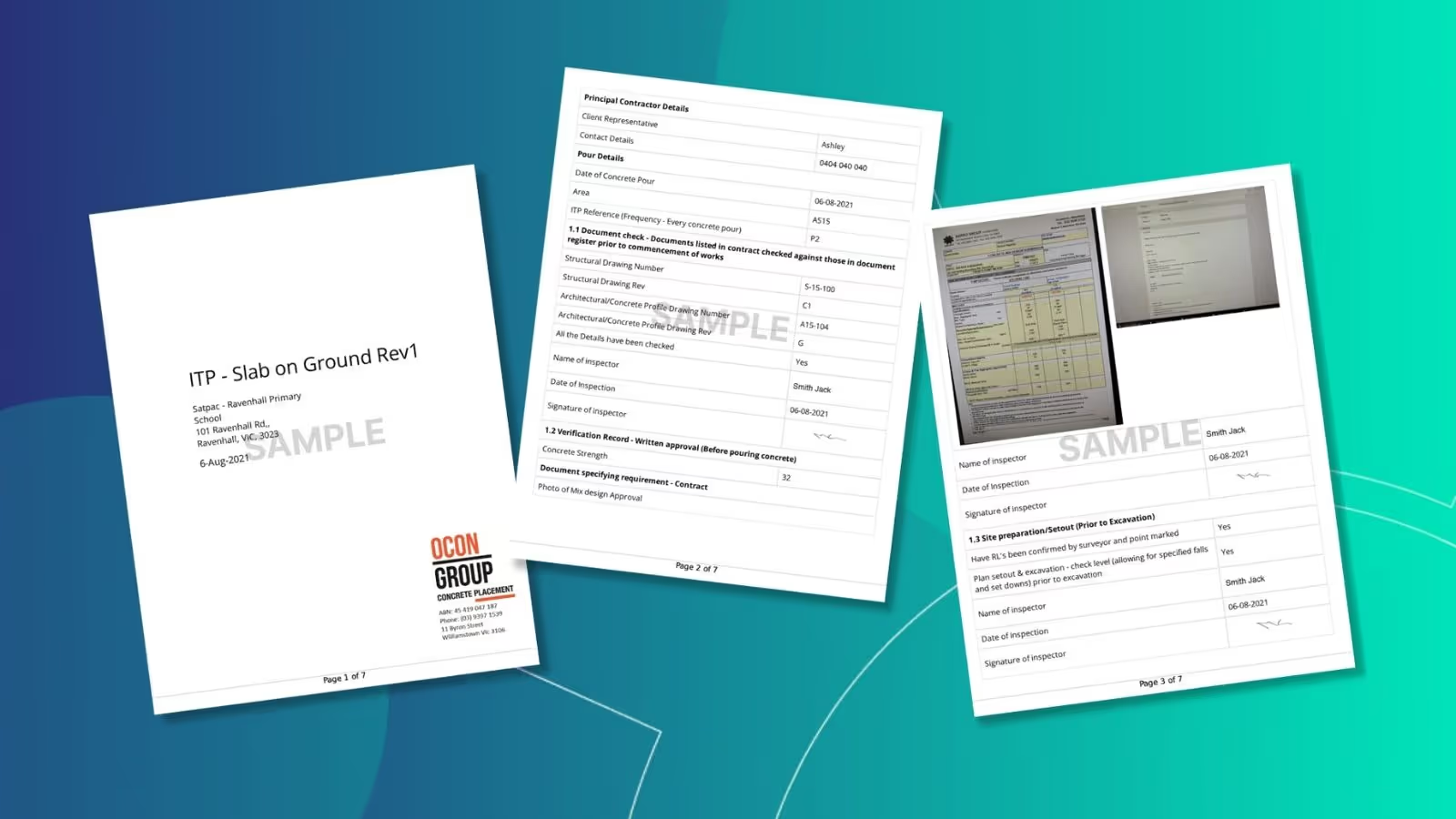
You will need to be able to create appropriate sections for the introduction, which may include the name of the head contractor, the name of the person who prepared the ITP, the document number, the date and any specifics around alphanumeric codes or acronyms you will be using.
Then, design the form to reflect the major packages that include a hold point, inspection point, specific piece of evidence, and any provisions for the person/s responsible for inspections to note the day and time, the outcome of the inspection and their signature.
Break the form up into sections using a system such as names or numbers that reflect the specific part of the works. In the case of a concrete structure, below is an example - for example:
- Setout
- Concrete placement
- Finishing
- Curing
- Etc...
For each subsection, include details of any specified standards or benchmarks to meet quality standards, space for task inspections, times/dates of completion and the all-important quality inspection information.
Tip #2 - Compile your evidence
An ITP is a keystone document in the event of any disputes, so just like you would with a good site diary, include the inspection criteria, quality requirements and the essential evidence to back it up. An effective digital form building package will allow you to upload and include scans or photos including delivery dockets, any third-party reports such as verification of product suitability, and photos of any relevant on-site works. Like the saying goes, get photos or it didn't happen.
This also has value in terms of your reputation - it demonstrates to your client that you are proud of your work, pay attention to detail, and have a strong sense of professional accountability. It also makes it easier for your client to produce evidence of compliance and quality of works if they face any tricky questions from a third party or their client.
The final piece of evidence your ITP needs to include is the relevant signatures of the person/s who inspect the various works and their acceptance criteria, your own site supervisor, and, in a best practice scenario, the head contractor or client. While it is possible to print out ITPs and then get them signed, then scan them back into the system, keeping everything in the one digital package with visible file change tracking is the most secure and least time-consuming way. A good ITP-building software will enable you to incorporate places for electronic signatures to be inserted.
Tip #3 - Add professional flourishes
Having a professional cover page with your logo and the client's company name and project name, as well as the relevant contact details for both parties, might seem like gilding the lily, but it is a valuable part of your overall business development approach.
It not only looks professional, it helps build your profile with the client. A major development project can include dozens of sub-trades and suppliers, and a major contractor might navigate dozens of projects in a year. Those visual cues of your logo, name, and address help make your company's identity easier to recognise if you are lodging a tender with that client down the track - and in this risk-averse industry, being seen as more professional than others can be the thing that gives you a bid-winning edge.
If you use a construction operations software, your ITP can also support options like page numbering, headers and footers with your company name, the project name and the date, all of which create a much more polished impression and give your ITPs a more legible appearance.
The final piece in the professionalism stakes is also ensuring your ITPs are part of a connected digital construction operations software that allows you to integrate ITPs, site drawings, scheduling, timesheets, and site diaries in one easy-to-manage and highly efficient whole.
Enhancing project management with custom forms in construction software Neo Intelligence
While the tips above provide a solid foundation for improving your ITPs, there's an additional tool that can take your project management to the next level: Neo Intelligence's Custom Forms feature. This unique aspect of our software empowers subcontractors to create and utilise best practice ITP forms tailored specifically for their projects.
- Customisable ITP forms for every project: Neo Intelligence understands that no two projects are the same, and our Custom Forms feature reflects this. It allows you to design ITP forms that are not just comprehensive but also specific to the unique requirements of each project. This means you can adjust the forms to suit different trades, project scopes, and stages, ensuring that every detail is captured accurately and efficiently.
- Streamlined process, enhanced accuracy: The Neo Intelligence Custom Forms feature simplifies the process of creating ITPs. With an intuitive interface, you can quickly build forms that include all necessary sections, such as introduction, quality requirements, inspection points, evidence submission, and signature fields. This streamlined approach reduces the time spent on administrative tasks, allowing you to focus more on the actual construction work.
- Digital integration for a seamless workflow: One of the standout benefits of Neo Intelligence's Custom Forms is its seamless integration with other digital tools. This integration ensures that your ITPs work in harmony with site diaries, scheduling, payroll, and other essential construction management functions. By having all these tools in one place, you can manage your projects more effectively, reducing the risk of errors and improving overall productivity.
- Empowering your team with easy-to-use technology: Recognising that most of our target audience comes from a trade background rather than a university education, we've designed our construction operations software to be super easy to use. This user-friendly approach means your team can quickly adopt and efficiently use the Custom Forms feature, regardless of their technical expertise.
Incorporating Neo Intelligence's Custom Forms into your project management toolkit can significantly enhance the way you handle ITPs. By customising forms to meet the specific needs of each project, streamlining the creation process, and integrating seamlessly with other digital tools, you can ensure that your documentation is as robust and effective as your on-site work. This not only aids in compliance and quality assurance but also bolsters your reputation for professionalism and attention to detail in the competitive construction industry. Our construction management system also helps you to keep all contract documents, copies of particular standards and a schedule of the ITP inspection test plan on hand for the team at all times.
Get in touch to learn how you can create seamless ITP forms - we'd love to show you!

Frequently Asked Questions
Construction management software for subcontractors is software that helps subcontracting businesses manage crews, schedules, labour hours, compliance requirements and site documentation across multiple projects. It is designed for labour-intensive, site-based work and supports payroll accuracy, EBA and award compliance and the records needed to verify work performed.
Neo is subcontractor operations software built to solve common problems around managing crews, labour hours, compliance requirements and site records across multiple projects. Disconnected schedules, manual timesheets, payroll errors and missing site records lead to rework, disputes and margin leakage. Neo replaces fragmented processes with a single platform that keeps labour data, site activity and compliance aligned across every job.
Neo is subcontractor software used by construction businesses managing crews across multiple sites and projects. This includes a wide range of labour‑intensive, field‑based trades, such as concrete placement, concrete pumping, formwork, steel fixing, civil construction and labour hire, that rely on accurate crew scheduling, labour tracking, site documentation and EBA or award compliance to run their business efficiently
Neo is built for subcontractors of different sizes that manage crews across multiple projects. The subcontractor operations software supports both growing teams and larger subcontracting businesses, scaling as workforce size, project count and operational complexity increase.
Spreadsheets and whiteboards rely on manual updates and are often out of date, leading to missed changes, double booking and fragmented records. Neo is subcontractor software that provides real‑time scheduling, automated crew notifications, linked timesheets and site records in a single platform, ensuring crews in the field and teams in the office work from the same up‑to‑date information.
Neo subcontractor software pricing is structured around packages that scale with your business. Costs depend on factors like workforce size and operational needs, ensuring subcontractors only pay for what they use. A demo is the best way to understand which package fits your business and expected ROI.
Other Blogs
How to build a labour estimate you can actually track against
Is your subcontracting business ready for productivity tracking? Four questions to ask first
Our guide to measuring and tracking labour productivity
Ready to see an easier way to run your subcontracting business?
Get the clarity, accuracy and confidence you need to keep jobs and crews moving.